Video Search Engine (Search Inside Videos)
1. What Is a Video Search Engine?
A video search engine is a system that lets you search inside video content itself — not just file names, titles, or metadata.
Instead of scrubbing through footage manually, a true video search engine allows you to:
- Search for objects (people, cars, packages, tools, animals)
- Search for spoken words or phrases
- Search for on-screen text (OCR)
- Search for events (fire, smoke, shouting, accidents)
- Jump directly to exact timestamps
This turns video from an unstructured file into structured, queryable data.
2. Why Searching Inside Videos Is Hard
Video has become one of the fastest-growing sources of data — from CCTV and drones to webinars, marketing videos, and social media.
Yet most organizations still store video like this:
- In folders
- With file names
- With a short description
- With a timestamp
This breaks down as soon as:
- You don’t know when something happened
- The footage is long
- Alerts were missed
- The video has no metadata
- You need to find something specific fast
Unlike text, video cannot be searched unless it is processed and indexed first.
3. What People Actually Mean When They Say “Search Inside a Video”
When users search for a “video search engine,” they usually mean one of the following:
- Search my CCTV footage for a person or vehicle
- Find every time a word is spoken in a video
- Search drone footage for defects or anomalies
- Find all moments with a specific object
- Search marketing videos for brand mentions
- Locate quotes or visuals inside long recordings
These are not abstract use cases. They represent real-world problems caused by video being stored without structured data.
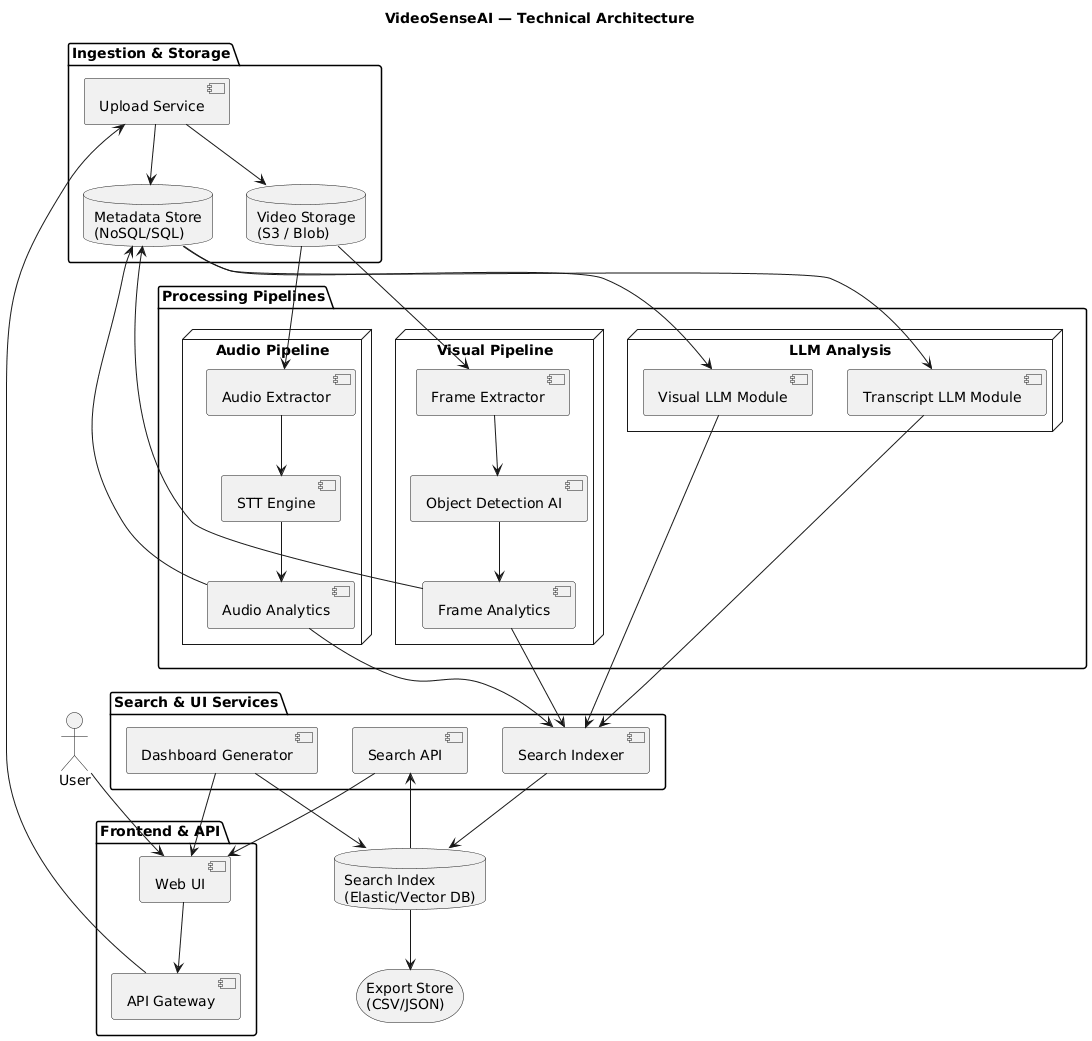
4. How a Video Search Engine Works (Simple Workflow)
Searching inside a video requires a multi-step AI pipeline:
Step 1 — Ingest the video
Upload a file or provide a public link (MP4, MOV, WEBM, YouTube, TikTok, X).
Step 2 — Extract intelligence
- Object detection (frame by frame)
- Speech-to-text transcription
- OCR for on-screen text
- Event detection
Step 3 — Build a searchable index
Every detection is linked to a timestamp and stored as structured metadata.
Step 4 — Query and explore
- “Show me all moments with a person”
- “Find every time the word ‘fire’ is spoken”
- “Where does a car appear?”
- “List all segments with smoke”
Instead of scrubbing, you query.
5. Why Basic Video Indexing Is Not Enough
Platforms like YouTube and Vimeo use transcripts and metadata for search.
This is not true video search.
A real video search engine requires:
- Frame-level object detection
- Exact timestamp tagging
- Structured indexing
- Vision + audio analysis together
- Queryable timelines
Without this, you are still guessing time ranges and manually scanning footage.
6. Practical Examples of Video Search Queries
Once video is indexed, it becomes queryable like a database:
Example 1 — CCTV Investigation
SELECT * FROM video WHERE object = 'person'
Example 2 — Spoken Words
SELECT * FROM video WHERE transcript CONTAINS 'fire'
Example 3 — OCR Text
SELECT * FROM video WHERE ocr_text CONTAINS 'invoice'
Example 4 — Timestamp Filter
SELECT * FROM video WHERE timestamp BETWEEN '10:00' AND '10:15'
Each result links directly to the exact second in the footage.
7. Use Cases Where Video Search Matters Most
- Security & surveillance investigations
- Drone inspections and asset monitoring
- Marketing video analytics
- Journalism and research
- Education and lecture indexing
- Legal evidence review
- Manufacturing defect detection
- Social media content analysis
Any organization storing hours of video will eventually need searchable video intelligence.
8. How VideoSenseAI Works as a Video Search Engine
VideoSenseAI automates the entire pipeline:
- Upload a video or paste a public link
- AI detects objects and transcribes speech
- Search inside the video by keyword or object
- Jump straight to relevant timestamps
- Export CSV summaries and insights
It is designed for post-processing and investigation workflows — especially for:
- Long videos
- Messy footage
- No-alert recordings
- Unknown timeframes
9. Video Search Engines vs Traditional VMS Platforms
Traditional VMS platforms are built for recording and live monitoring.
They are not built for:
- Search across long footage
- Search without knowing the timeframe
- Querying by objects or words
- Timeline reconstruction
A video search engine is built for investigation and discovery.
10. The Future of Search Is Visual + Audio
Most new data is video.
Storing it without understanding it will not scale.
Searchable video intelligence is becoming a necessity — not a luxury.
Organizations that treat video like queryable data will move faster, investigate faster, and extract more value from their content.
11. Final Takeaway
A video search engine turns raw footage into searchable data.
Instead of scrubbing through hours of video, you ask questions and get answers.
If you have ever wished you could search inside a video like you search inside text — this is exactly what video search engines are built for.
Read also: How to Turn Video Into Searchable Data
Further Reading
If you want to go deeper into how searchable video intelligence works in practice, these guides explain the technical side and real-world use cases:
- How to Turn Video Into Searchable Data Using AI
- How to Search Inside Videos for Objects, Words, or Events (2026 Guide)
These articles walk through how AI extracts structured metadata from raw video and how that data becomes searchable by keyword, object, or timestamp.