Search Inside Videos: Find Objects, Words & Events Using AI
Search Inside Videos: Find Objects, Words & Events Using AI
Video has become the dominant format for data — from CCTV archives and drone footage to webinars, marketing videos, and user-generated content.
Yet once a video is recorded, it becomes a black box. You can’t easily search inside it to find specific moments, spoken words, or objects without watching the entire file.
This page explains what it actually means to search inside videos, how it works, and why this capability is becoming essential for modern teams.
1. Why Searching Inside Videos Is So Hard
Traditional video storage relies on:
- File names
- Basic metadata
- Folder structures
- Manual notes
This approach breaks down as soon as your video library grows beyond a few hours.
If someone asks:
- When did a person enter the frame?
- Show me every moment a specific object appears.
- Find all timestamps where a certain word was spoken.
- What happened right before the alarm?
…the usual answer is still the same: manual scrubbing.
Unlike text, video has no built-in way to query its internal content.
2. What People Actually Mean by “Search Inside Videos”
When people search for “search inside videos,” they usually mean one of these things:
- Find objects (people, cars, packages) in a video.
- Search for spoken words or phrases.
- Jump directly to the exact timestamp of an event.
- Summarize long footage into structured insights.
- Filter a video timeline by what appears.
This isn’t about finding videos on YouTube.
This is about searching inside your own footage.
3. How Searching Inside a Video Actually Works
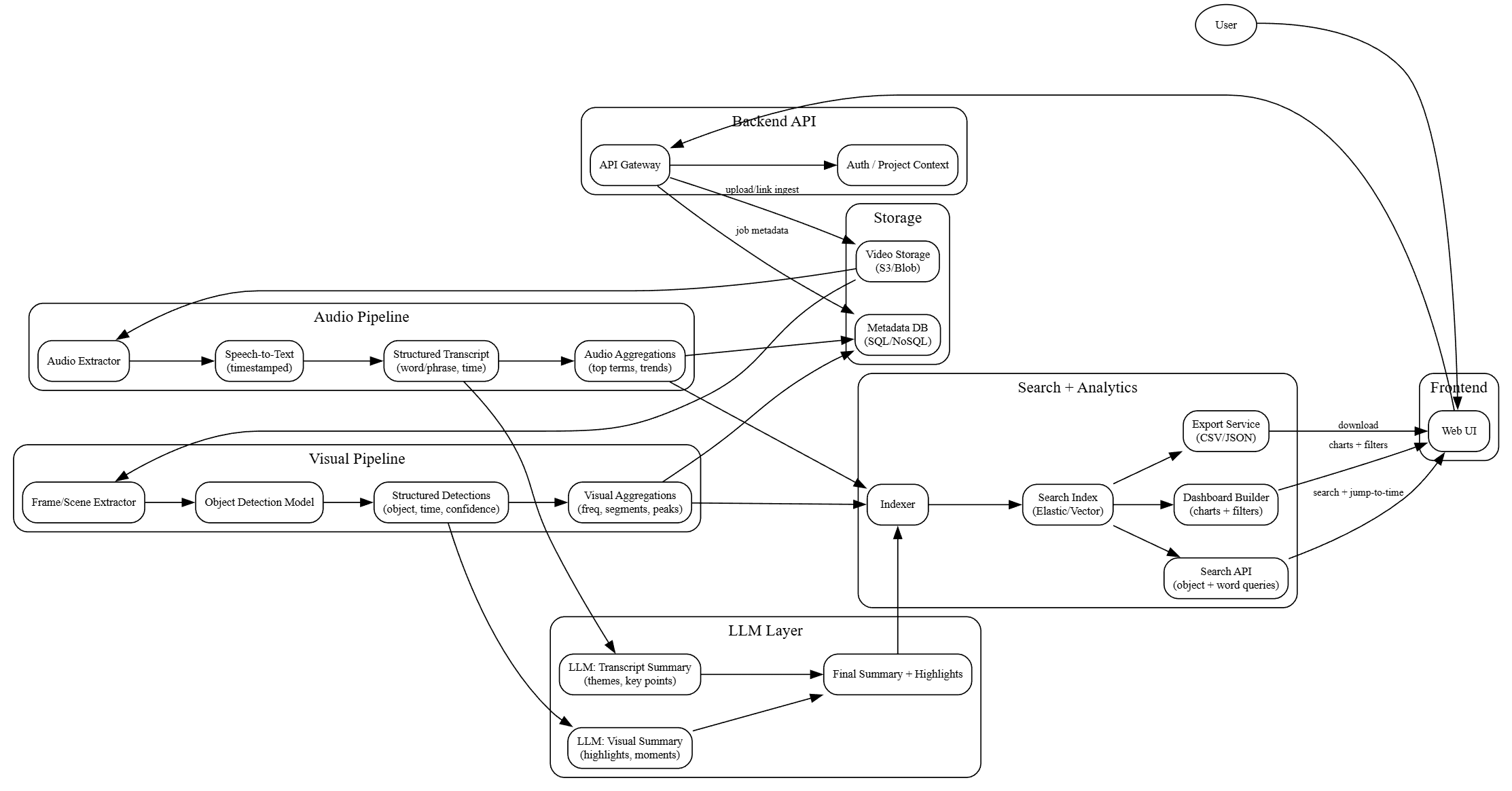
Searching inside a video requires turning raw footage into structured data.
The typical pipeline looks like this:
- Ingest the video file (MP4, MOV, WEBM, or public link).
- Run object detection frame by frame.
- Transcribe audio using speech-to-text.
- Detect events and contextual entities.
- Attach exact timestamps to every detection.
- Store everything in a searchable index.
Once indexed, the video behaves like a database.
You can now ask:
- Where does this object appear?
- Show me all moments with a spoken keyword.
- List video segments with smoke or fire.
- Find all appearances of a person holding something.
Instead of scrubbing, you query.
4. Why Basic Video Indexing Isn’t Enough
Platforms like YouTube and Vimeo use transcripts and metadata for search.
But this only scratches the surface.
True video search requires:
- Frame-level object detection.
- Exact timestamp tagging.
- Structured indexing for timeline queries.
- Multi-modal understanding (vision + audio).
Without this, search results remain approximate, incomplete, or inaccurate.
5. Use Cases Where Searching Inside Videos Matters Most
Security & Surveillance
Find when a person or vehicle appeared across hours of footage.
Content & Media Teams
Locate brand mentions, spoken phrases, or recurring visual themes.
Marketing & Advertising
Measure when products appear or are mentioned inside videos.
Education & Research
Turn lectures and interviews into searchable study material.
Drone & Inspection Footage
Search for defects, anomalies, or specific visual features.
6. Practical Example: How Tools Like VideoSenseAI Work
Tools in this space automate the entire indexing pipeline.
For example, platforms like VideoSenseAI’s video search engine turn raw video into searchable data by:
- Detecting objects across every frame.
- Transcribing speech.
- Extracting events.
- Building a structured timeline.
You can then:
- Search inside the video by keyword or object.
- Jump directly to exact timestamps.
- Export CSV summaries.
- Analyze long footage without scrubbing.
7. Search Inside Videos vs Classic Search Engines
YouTube and Google search rely on:
- Titles
- Descriptions
- Tags
- Captions
They don’t analyze every frame for visual content.
Searchable video intelligence does.
It extracts what is actually inside the file — not just what’s written about it.
8. Frequently Asked Questions
Can I search inside my own videos for objects or words?
Yes. You need AI video indexing tools that extract structured metadata and timestamps.
How does video search work?
By processing video frame by frame, transcribing audio, and storing detections in a queryable index.
Does this work for long videos?
Yes. Modern tools are designed to handle hours of footage.
Why isn’t YouTube search enough?
Because YouTube search relies primarily on metadata and captions.
9. The Future of Search Is Visual + Audio
As video becomes the dominant form of digital content, storing it is no longer enough.
We must understand it.
Searchable video intelligence — where you can ask questions about video content the same way you query a database — is becoming the next standard.
10. Final Thoughts
Searching inside videos means going beyond file names and metadata.
Modern tools use AI to generate structured data from video so you can ask real questions and get real answers — instantly.
If you’ve ever wished you could find specific visuals, spoken words, or events inside hours of footage, searchable video intelligence is the solution.
Learn more about how a video search engine works and how it turns raw footage into queryable data.
Further Reading
If you want to go deeper into how searchable video intelligence works in practice, these guides explain the technical side and real-world use cases:
- How to Turn Video Into Searchable Data Using AI
- How to Search Inside Videos for Objects, Words, or Events (2026 Guide)
These articles walk through how AI extracts structured metadata from raw video and how that data becomes searchable by keyword, object, or timestamp.