Avigilon Unity vs VideoSenseAI: Video Analytics, Search & Investigation Compared
1. Why This Comparison Exists
Most VMS platforms (Video Management Systems) are excellent at what they were built for: recording, live viewing, basic motion alerts, and camera management.
The challenge appears after the fact — when something already happened and you need answers.
Typical investigative questions sound like:
- When did the person enter? How many times did they appear?
- How many vihicles appear and at what time?
- Show me every moment with a person and a backpack
- Show me all the objects/things identifying in my footage
- Find the exact timeframe across a long recording when a specific object appears — fast
If the footage has no clear alert, no precise timeframe, or spans a long recording, the usual outcome is the same: manual scrubbing.
VideoSenseAI is not built to replace a VMS. It is designed for post-processing and investigation — specifically for situations where alerts were missed, footage is messy, or the timeline is unknown.
2. Platforms Covered in This Comparison
This article compares VideoSenseAI against commonly used VMS platforms:
- Avigilon Unity (formerly Avigilon Control Center / ACC)
- Milestone XProtect
- Genetec Security Center (Omnicast)
- Axis Camera Station
- Hanwha Wisenet WAVE
- DW Spectrum (Network Optix)
We cover functionality first, then pricing models, and finally where each approach makes sense.
3. What a VMS Is Great At (and Where It Stops)
A typical VMS is built around a camera-first operational model:
- Live monitoring
- Recording and playback
- Motion or rule-based alerts
- Multi-camera layouts
- User permissions and access control
- NVR / server management
Search functionality in most VMS platforms is usually limited to:
- Motion events
- Time ranges
- Camera name
- Basic “smart search” (depending on paid analytics and camera support)
This works well if you already know exactly when something happened.
The real problem: in many investigations, you don’t.
4. The Core Limitations of VMS Object Detection in Investigations
4.1 Limited object classes
Even when analytics are enabled, most VMS platforms support a small, vendor-defined set of object classes such as:
- Person
- Vehicle
- Sometimes animal
If you need to search for:
- Backpacks or packages
- Tools
- Unknown objects
- Clothing descriptions
- “Person holding something”
- Unusual activity patterns
You usually cannot ask the system. You can only filter within the categories it was designed for.
4.2 Tight coupling to camera and hardware ecosystems
Many analytics features depend on:
- Specific camera models
- Specific firmware versions
- Vendor AI chips
- NVRs with analytics support
- Paid analytics modules
In practice, you are not just buying software — you are buying into an ecosystem.
4.3 “Smart search” is still not true search
Even with smart search enabled, workflows often look like:
Pick a time range → scan thumbnails → jump around → hope you catch the moment.
That is faster than raw scrubbing, but it is not the same as having a fully indexed, searchable timeline of everything that appeared across a recording.
5. What VideoSenseAI Does Differently
VideoSenseAI is designed around a footage-first investigation workflow.
5.1 Core idea
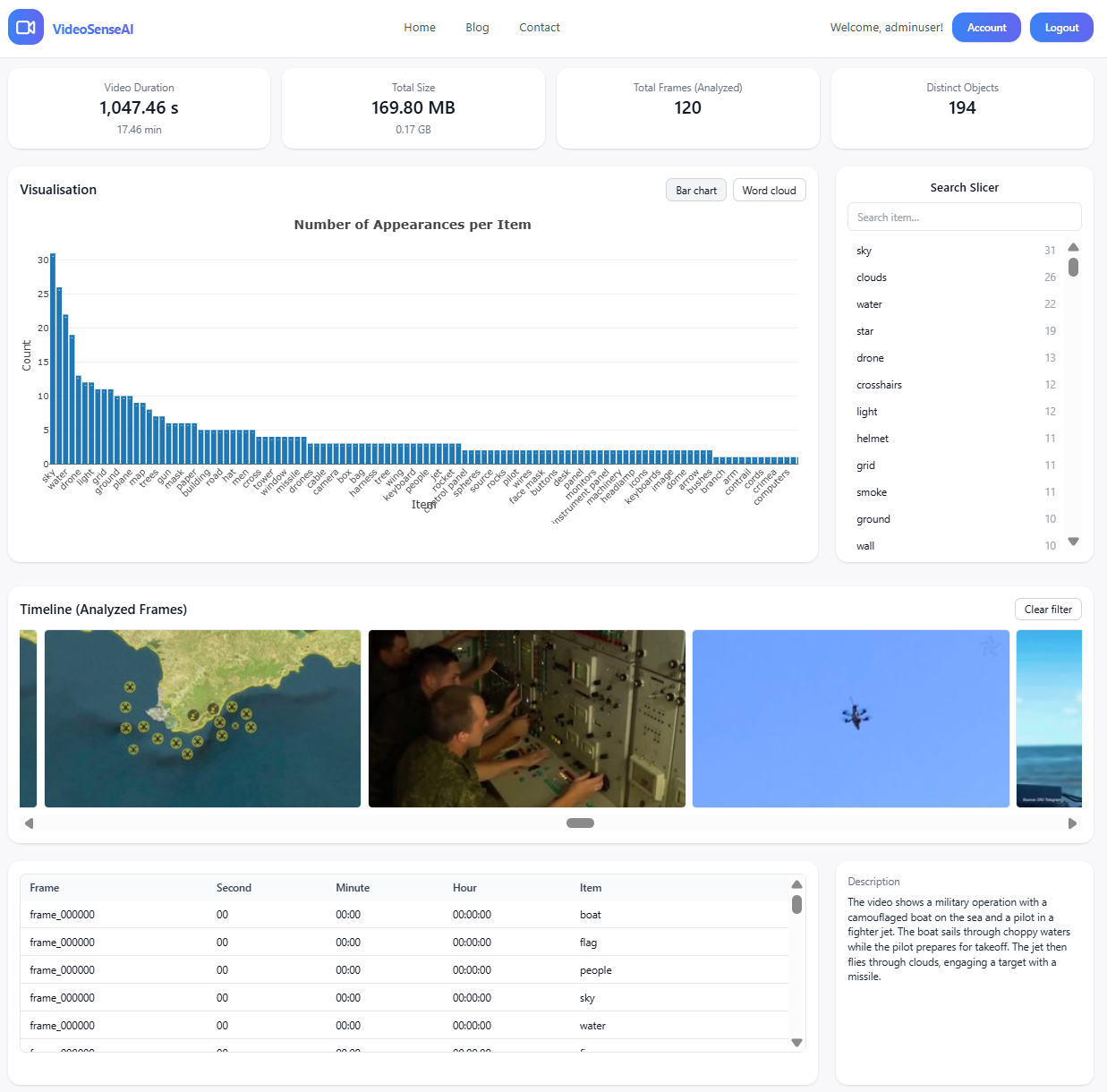
You upload a CCTV or drone recording (for example, one hour or longer), and VideoSenseAI will:
- Scan the entire video
- Detect people and relevant objects
- Extract a structured timeline of events
- Expose searchable filters with exact timestamps
Instead of scrubbing, the workflow becomes:
Filter → click → jump to the exact second
5.2 Why this works for messy or missed footage
VideoSenseAI does not rely on:
- Pre-configured alerts
- Motion rules
- Vendor-specific cameras
It works directly from the video file, making it well suited for:
- Missed events
- No-alert recordings
- Long footage with no clear timeframe
- Investigative review of live camera recordings
5.3 Semantic analysis of audio (when available)
Most VMS platforms ignore audio entirely.
VideoSenseAI can support semantic analysis on sound, such as:
- Shouting
- Glass breaking
- Loud bangs
- Speech context and keywords
This is valuable in post-incident review, where audio often provides context that motion alerts miss.
6. Functionality Comparison
| Capability | Traditional VMS | VideoSenseAI |
|---|---|---|
| Recording & live monitoring | Excellent | Not the goal |
| Basic motion alerts | Yes | Not the core focus |
| Smart search | Limited and vendor-dependent | Built-in workflow |
| Search across long footage | Often partial | Designed for this |
| Search without timeframe | Hard | Strong use case |
| Post-event investigation speed | Can be slow | Very fast |
| Semantic audio analysis | Usually no | Yes |
| Hardware ecosystem dependence | Often yes | No |
7. Pricing Models: How VMS Platforms Charge
Most VMS platforms charge per camera or per channel, often with additional costs for analytics modules, servers, support, and upgrades.
- Milestone XProtect: device licenses
- Genetec Security Center: camera connection licenses
- Axis Camera Station: channel licenses
- DW Spectrum: per-channel pricing
- Hanwha WAVE: channel packs
Enterprise deployments are often quote-based, with final pricing depending on region and integrator.
8. Pricing Comparison (Typical Structure)
| Platform | Pricing Unit | Hidden Costs | Best Fit |
|---|---|---|---|
| Avigilon Unity | Per camera (quote-based) | Analytics, servers, support | Enterprise deployments |
| Milestone XProtect | Per device | Care plans, servers | Mid/large deployments |
| Genetec Security Center | Connection licenses | Modules, integrators | Enterprise SOCs |
| Axis Camera Station | Per channel | Hardware scaling | Axis-centric setups |
| Hanwha WAVE | Channel packs | Scaling, support | Budget/mid deployments |
| DW Spectrum | Per channel | Server sizing | Flexible deployments |
| VideoSenseAI | Footage analysis | No per-camera lock-in | Fast investigations |
9. Who Should Use What
Use a VMS if:
- You need real-time monitoring
- You manage many cameras
- You need access control and NVR reliability
Use VideoSenseAI if:
- You need rapid post-event review
- You want searchable timelines
- You don’t know the timeframe
- You want deeper investigative insight
10. Final Takeaway
This is not “VMS vs VideoSenseAI.”
It is:
Operations vs Investigation.
VMS platforms record. VideoSenseAI helps you understand what happened.
Check this article on how VideoSenseAI wokrs: https://videosenseai.com/blogs/turn-video-into-searchable-data/
Related Guides
If you're exploring AI-powered video intelligence, you may also find these in-depth guides useful:
- What Is a Video Search Engine? How AI Turns Video Into Searchable Data
- How to Search Inside Videos for Objects, Words & Events Using AI
These resources explain how modern video indexing works and how you can turn long footage into structured, searchable data.