How to Audit an Influencer Campaign Using AI Video Analysis
The Problem with Influencer Campaign Reporting
Brands spend thousands of dollars on influencer campaigns — but most campaign reports tell you clicks, reach, and impressions. They don't tell you whether the creator actually showed your product on screen, how long it was visible, or whether they verbally mentioned your brand at all.
You're essentially trusting the creator's word.
AI video analysis changes that. Instead of rewatching every sponsored TikTok manually, you can run each video through an AI tool that detects objects frame-by-frame, transcribes the full audio, and exports timestamped data — giving you verifiable, structured proof of exactly what happened inside the video.
This guide explains how to do it using VideoSenseAI.
What Does "Auditing an Influencer Video" Actually Mean?
When a brand runs an influencer campaign, the core questions are:
- ●Did the creator actually show the product on camera?
- ●How many times did the product appear, and at which timestamps?
- ●Was the brand or product name verbally mentioned?
- ●Did competitor products also appear in the same video?
- ●Was the tone of the verbal content positive and on-message?
Traditional reporting cannot answer any of these questions. A video analytics tool can answer all of them — automatically, with exportable proof.
A Real Example: Cold Brew Brand in a Fitness TikTok
To make this concrete, here's a real use case. A fitness creator posted a TikTok about his daily high-protein diet. The video was approximately 30 seconds long. A cold brew brand had a sponsorship arrangement with this creator and wanted to verify the deliverable.
Running the video through VideoSenseAI produced the following:
- ●73 distinct objects detected across 30 analyzed frames
- ●The can appeared 4 times, at seconds 9, 10, 15, and 16
- ●The transcript captured the creator saying "I get to the office, I have my cold brew" — a verbal mention with a timestamp
- ●The bar chart ranked the can against all other detected objects, showing its visual share vs protein tubs, bowls, and other items
- ●All results were exportable as CSV for campaign reporting
In under a minute, the brand had verified visual placement, verbal mention, and timestamp-level data — without watching the video manually.
Step-by-Step: How to Audit an Influencer Video with VideoSenseAI
Step 1 — Collect the TikTok or video URL
VideoSenseAI accepts direct TikTok links and X (Twitter) video links, or you can upload an MP4/MOV/WEBM file directly. No need to download the video manually.
Step 2 — Paste the link and run the analysis
Paste the creator's video URL into the input field and click Run. The tool will automatically download the video, analyze it frame-by-frame, and transcribe the audio. Processing a 30-second TikTok typically takes under a minute.
Step 3 — Check visual object detection
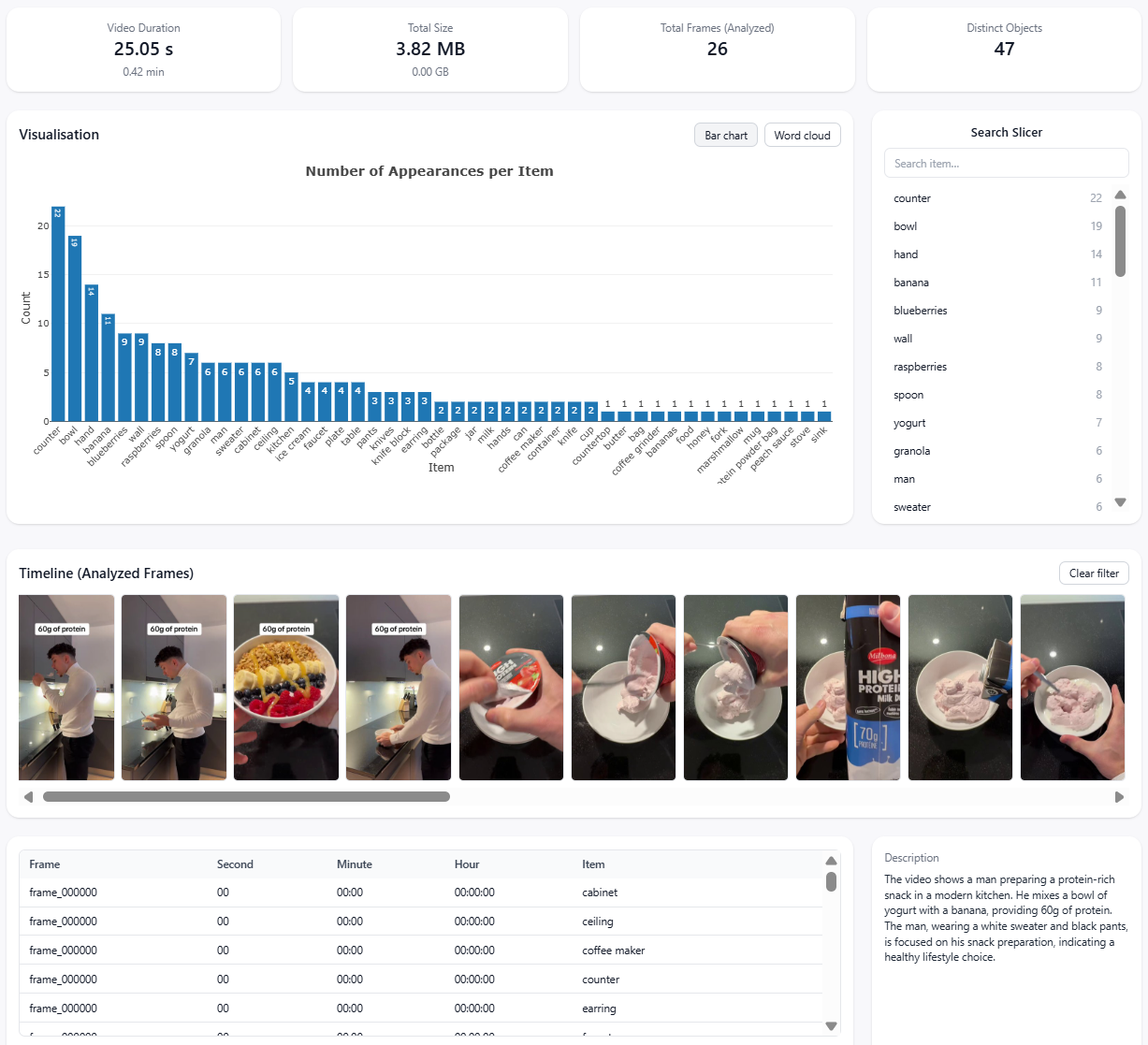
The bar chart shows every detected object and how many times it appeared across all analyzed frames. To audit your product specifically, use the Search Slicer to filter by the relevant object type (e.g., "can," "bottle," "box"). The timeline view will highlight exactly which frames contain your product, with precise timestamps.
Step 4 — Search the transcript for brand mentions
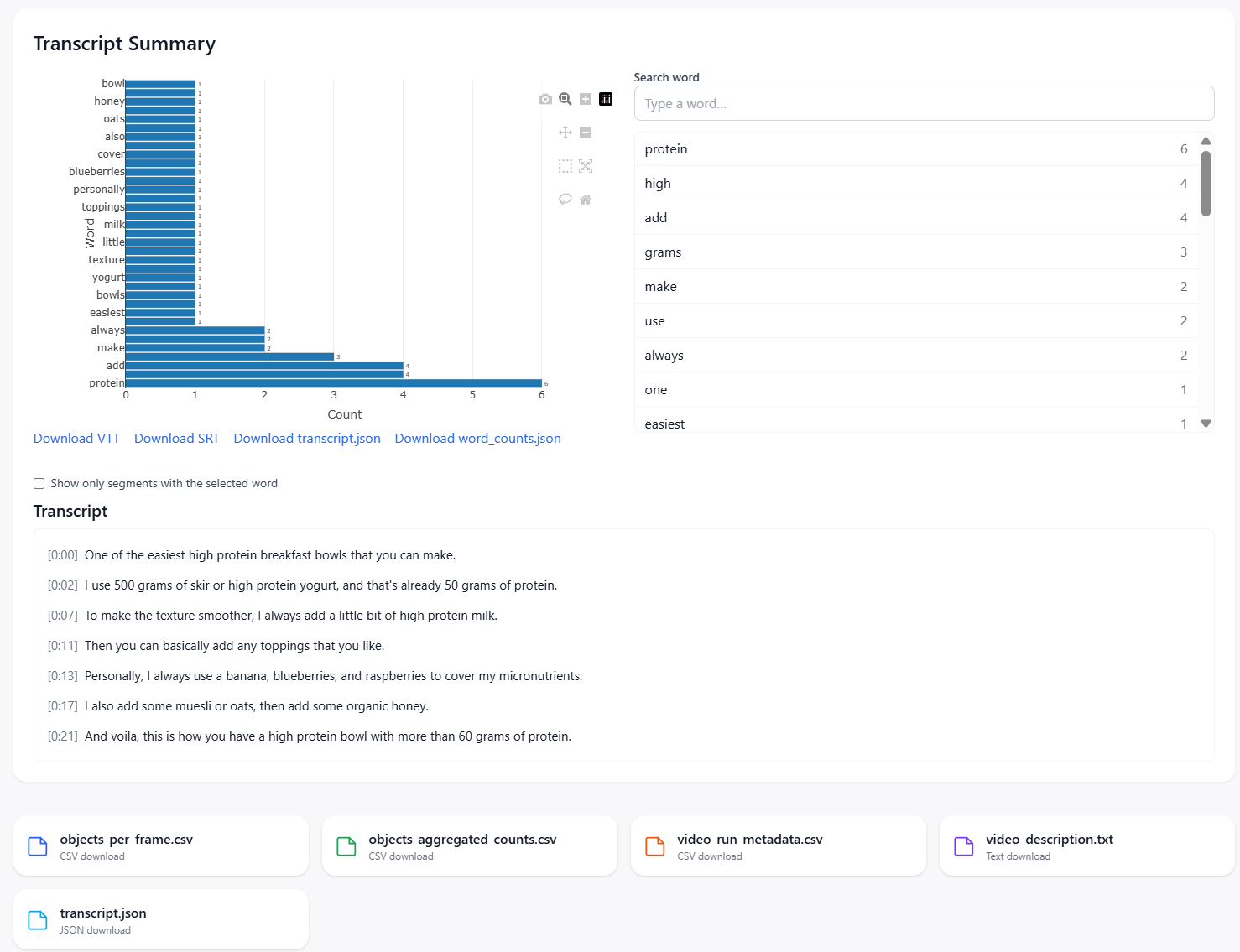
In the Transcript Summary section, use the keyword search to find your brand name, product name, or campaign keywords. The tool will show how many times each word appeared and let you jump to the exact second it was spoken. You can download the full transcript as VTT, SRT, or JSON.
Step 5 — Export the data
Download the objects-per-frame CSV, the aggregated counts CSV, the transcript JSON, and the word counts file. These give you structured, reportable evidence of what appeared in the video and when — ready to include in a campaign performance report or share with a client.
What You Can Catch That You'd Otherwise Miss
Manual review of influencer content is unreliable and slow. With AI video analysis, you can systematically detect:
- ●Product never shown: The creator mentioned the brand verbally but the product was never visible on screen
- ●Competitor products present: Another brand's product appeared alongside or instead of yours
- ●Minimal exposure: Your product appeared once in a 3-minute video, mostly obscured
- ●Off-message verbal content: The transcript shows the creator used negative or off-brand language around the product mention
- ●No verbal mention at all: Product shown visually but never spoken about, despite the brief requiring a verbal callout
Who Should Be Using This
This workflow is most valuable for:
- ●Marketing agencies managing influencer budgets for multiple clients who need fast, scalable verification
- ●Brand managers who want evidence that contracted deliverables were met before releasing payment
- ●Performance marketers correlating product visibility data with click-through or conversion results
- ●Influencer platforms looking to add verification and compliance features to their reporting suite
Beyond Compliance: Using the Data to Improve Future Campaigns
Audit data isn't just for catching problems — it's a feedback loop. Over time, if you analyze multiple creator videos, you can identify patterns: which creators show the product most prominently, which verbal framings generate the most engagement, which visual contexts (kitchen vs gym vs outdoor) correlate with better performance.
That turns influencer marketing from a trust-based arrangement into a data-driven one.
VideoSenseAI exports all detection and transcript data as structured CSVs, which means you can aggregate it across campaigns, compare creators, and build your own benchmarks — without relying on platform-reported metrics alone.
Try It on Your Next Campaign
The next time an influencer submits a deliverable, don't just watch the video once and move on. Paste the link into VideoSenseAI, run the analysis, and download the timestamped object and transcript data before signing off.
It takes under a minute. The output gives you verifiable, exportable proof of what was — and wasn't — in the video.